
thola is not a dashboard.
2026-05-19 · 6 min read · by the thola team
The first internal name for thola was "BizOS". The second was "OneView". The third was "Atlas." All three are dashboard names — and we kept arriving at dashboard names because the first thing every team wants to build when they get a pile of customer data is a chart.
Charts are easy. They look serious. They are also, in our market and at our customer size, mostly useless.
We are launching today with a different bet: agents, not dashboards. This post is about why.
The thing dashboards quietly assume
A dashboard assumes that the person looking at it knows what to do with what they see.
It assumes:
- they know which numbers matter,
- they know what a "normal" range looks like for their industry,
- they have the time to scan ten different views and synthesise a verdict,
- and that once they've synthesised the verdict, they have a separate tool — or a separate human — to act on it.
For a 200-person company with a head of ops, that's a fair set of assumptions. For our customers — a 6-person SaaS company in Bangalore, a 12-person clinic in Coimbatore, a 4-shop kirana chain in Pune — it's a fantasy.
Our customers don't need a dashboard. They need a competent operations team they can't afford to hire.
That's the spec.
What we built instead
thola is structured around five specialist agents — Sales, Finance, HR, Process, Founder — and one orchestrator agent called the Planner. You talk to the Planner. The Planner figures out who should answer and routes. The right agent does the work.
This is the shape:
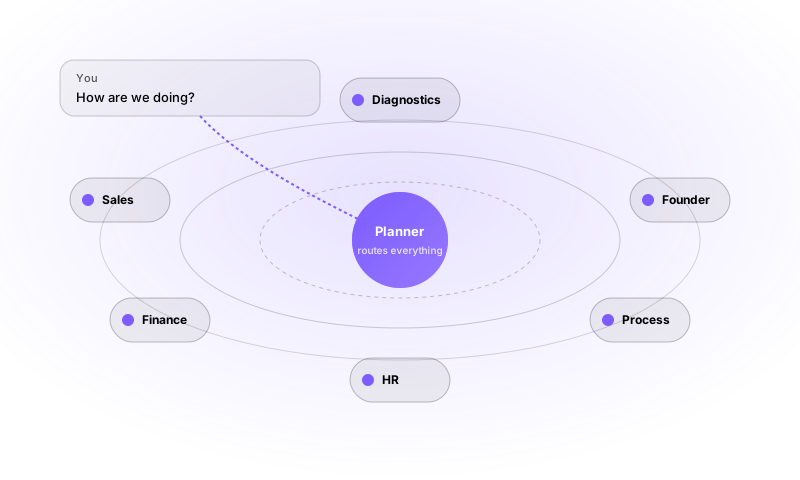
The agents have tools. They can read your sales records, draft emails, run forecasts, create tasks, schedule payroll. When something needs your approval (sending money, sending a message to a customer, hiring someone), they pause and ask. When something is read-only, they just do it.
You never name an agent. You never pick from a menu of "skills." You ask in your own language. The Planner picks.
Why this is hard
It would have been much faster to ship a chatbot bolted onto a charting library. There's a Python notebook somewhere that probably does our v0 in 200 lines.
The hard parts of doing it for real:
- Grounding. Every reply has to be a real query against your real workspace data. Hallucinations are death. We do not let the model improvise numbers.
- Permissions. When an Admin asks "show me all deals" they see all deals; when a Sales rep asks the same thing, they see only theirs. The agent does not have a single notion of "all data" — it has your notion.
- Confirmation gates. Some actions are reversible (update a tag), some are not (send a payment, send an email to a customer). The model has to know which is which and pause for the non-reversible ones.
- Audit. Every agent action is logged with the user, the time, the prompt that triggered it, and the data it touched. If someone in your team makes a bad call via an agent, you need to be able to reconstruct it.
- Cost. Running these models is real money. We meter usage at the action level, charge a tiny margin, and pass the price honesty straight through. (More in What one thola token actually costs.)
None of that is novel research. All of it is plumbing. But the plumbing is what separates a demo from a product you can run a business on.
What changes when you ship this
Three things, in order of how often we hear them back:
1. The question goes first
Without thola, a non-technical operator starts by clicking around looking for the right chart. With thola, they ask the question that's actually on their mind: "Are we behind on cash this month?" and the answer comes back as a sentence.
The difference is more profound than it sounds. The dashboard-first version requires the user to translate their human concern into the tool's vocabulary. The thola version doesn't.
2. Action becomes one tap from the answer
The answer ends with a question of its own: "Want me to draft a payment reminder for the three overdue invoices?" — and a tap commits the action.
The classical reporting workflow is: open dashboard → spot problem → switch tool → take action. That switch-tool step is where most ops work dies, because no one switches tool in the middle of a busy afternoon. With thola, action is one tap inside the same chat.
3. The product gets better the more you use it
The Planner picks up workspace memory — facts about your business, your norms, the people you talk about. The Sales agent learns which prompts your team uses most and pre-empts them. The diagnostics rules calibrate to your peer cohort. None of this is "AI learning your data" in the scary sense — there's no model retraining on you. But the context gets richer, and richer context is most of what makes an agent feel useful.
Where we're being deliberately quiet
A few things thola does not do, and won't:
- We do not auto-execute customer-facing actions without your sign-off. Even on the most "agent-first" workspaces.
- We do not aggregate your data into a cross-customer dataset. Your tone vectors, your memory facts, your check-in answers — none of it travels.
- We do not promise to replace your accountant. The Finance agent is excellent at cashflow and pretty good at anomaly detection. It is not GST counsel.
Where we're not done
A short, honest list of things on the roadmap that we know aren't great yet:
- The conversation-recovery flow when a chat times out mid-action is awkward. Working on it.
- The mobile chat is faster than the web chat but has fewer presentation features. Closing the gap.
- The OCR for handwritten cash books is best-effort. Some scripts are noticeably better than others.
- Forecasting beyond 60 days is conservative by default. Some users want it more aggressive. We'll make that switchable.
We'll write about each of these as we close them out.
Where to go from here
If you'd rather see than read, the user guide is the fastest tour of the product.
If you want to skip the tour and just try, open thola (opens in a new tab). The free tier is real; no card needed.
Either way: welcome to the thing we've been building.
Related posts
The Monday morning that doesn't start with a spreadsheet.
Fourteen tabs of 'Final v3 USE THIS ONE'. Sunday-night dread. Three days of context-switching to read your own business. Here's what changes when you fire all of that.
Cash control that fits your shop.
A solo owner, a family helper, and a four-counter supermarket need three different kinds of cash discipline. Here's how one setting scales across all of them — and why the day-close should reassure you, not accuse anyone.
Catching cashflow trouble three weeks earlier.
Most founders learn they have a cash problem on the Sunday they update the runway sheet. Here's what the same problem looks like when you see it the day it starts.