
Memory & history
There are three layers of memory in thola. Knowing what each one does will save you a surprising number of awkward "wait, why doesn't thola remember that?" moments.
In-chat memory dies with the chat. Workspace memory survives across chats. Personal memory follows you.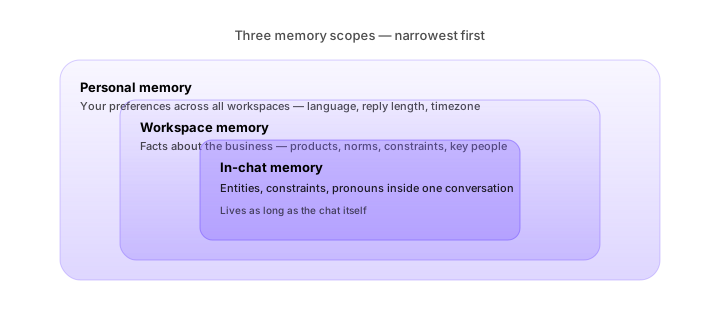
The three layers
| Layer | Scope | Lifetime |
|---|---|---|
| In-chat memory | Single conversation | Lasts as long as the chat exists |
| Workspace memory | Whole workspace, all members | Persists across chats, members |
| Personal memory | You, across workspaces | Persists across chats, visible only to you |
In-chat memory
This is the conversational context inside one chat. The Planner remembers:
- Every entity mentioned (deals, people, invoices)
- Every constraint (filters, date ranges, currencies)
- Every reference (pronouns, "that one", "the youngest one")
In-chat memory is what makes the chat feel coherent across turns. It doesn't survive into a new chat. If you start a new chat about the same topic, thola won't pretend to remember the conversation — and that's deliberate.
Workspace memory
This is the layer most people don't realise exists. It's also the most useful.
When you tell thola something about the business — "our flagship product is Atlas," "we discount on net-90 terms for enterprise," "we don't sell in Europe" — the Workspace Memory worker extracts it into a long-term fact store. The next time anyone in the workspace asks a related question, the Planner pulls in that context.
So a co-founder asking "can we discount this enterprise deal?" sees the answer "yes, net-90 is the established norm" — without ever having said anything about discounts themselves.
What gets stored
Facts the Memory worker extracts:
- Identity — business name, brand names, key products, locations
- Commercial norms — pricing rules, discount structures, payment terms
- Constraints — what you do / don't do, who you do / don't sell to
- Goals — current targets, milestones, deadlines
- People — co-founders, key employees, key customers
- History — major events (funding, launches, pivots)
What doesn't get stored
By design:
- Free-text answers to weekly check-ins (founder mental-health stuff)
- Anything marked private in chat (prefix a message with
private:and it skips the worker) - Customer PII below the workspace level (we don't memorise individual customer chat history)
How to view and edit
Open Settings → Workspace → Memory. You see every fact thola has stored, with:
- The fact (in your workspace's language)
- The chat it was extracted from
- The date
- An Edit and Forget button
Forget removes the fact from the active set and from future Planner context. It is reversible for 7 days.
Personal memory
This is your memory across workspaces. The kind of thing a good assistant would remember about you:
- Your preferred reply length
- Your reply language preference
- Your timezone
- Your morning briefing preference
Personal memory doesn't store business data — only preferences. It is invisible to other workspace members.
Edit under Profile → Preferences.
Chat history
Separate from memory: the chat history itself.
- Every chat is saved with its full message log.
- Find old chats from the sidebar Chat history entry; filter by date or search by content.
- A chat can be starred for quick access.
- A chat can be archived to hide it from the main list (still searchable).
- A chat can be deleted — gone, irreversible.
Search
The chat search box at the top of the history list runs across:
- Chat titles
- Message bodies
- Tagged entities (deals, customers)
Search is workspace-scoped — you only see chats you have access to under RBAC.
Sharing
Any chat can be shared with another workspace member via the Share button. Sharing makes the chat read-only for them; they can fork a new chat from it but cannot edit yours.
External sharing (to people outside your workspace) is disabled by default for the Free and Starter plans, and gated by an extra confirmation on Growth and above. We do not want investor data leaking through a casually-shared link.
Audit log
For Admins, every memory edit, every chat deletion, and every shared link is recorded in the Audit log (Settings → Workspace → Audit). The log is exportable as CSV for compliance reviews.
Common questions
Will thola remember my chat after I delete it? No. Deletion is hard delete — the chat is removed from storage. Workspace memory facts derived from that chat persist unless you also forget them.
Why did thola misremember something? Almost always because two pieces of conflicting information landed in workspace memory. Open Settings → Workspace → Memory, search for the topic, and forget the wrong fact. The right one will remain.
Can I export everything for an audit? Yes — Settings → Workspace → Export. You get a tarball with every chat (JSON), every memory fact, every audit-log entry. Exports take a few minutes; you'll get an email when ready.
→ Next: Red Flags & diagnostics