
Playbook & workflows
A Playbook is a multi-step workflow with an owner, a schedule, and a goal. It is the way thola turns "good idea" into "thing that happens."
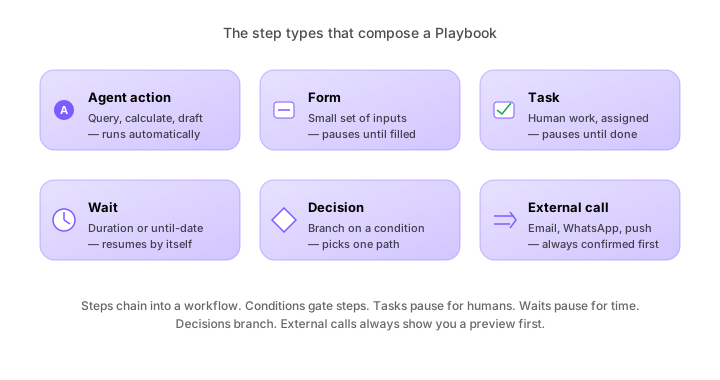
Most thola users don't build a Playbook from scratch. They accept one of the ~40 templates we ship, customise three fields, and turn it on. The remaining ones who do build from scratch tend to be at companies where one founder is so good at a thing that they want it codified for the rest of the team.
What a Playbook is
In structure:
Playbook = trigger + steps + owner(s) + closure- Trigger — what starts the Playbook. A flag, a schedule, a chat command, or a metric crossing a threshold.
- Steps — an ordered list. Each step is either an agent action (draft email, calculate, send), a form (collect input), a task (assign to a human), or a wait (24 hours, until the next morning, etc.).
- Owner(s) — who's responsible for the run. Can be a single person or a role (e.g. "the Sales lead, whoever that is").
- Closure — a check that the goal was achieved. If not, the Playbook stays open and the Planner asks why.
How a Playbook runs
When a Playbook is triggered, thola opens a run of it. A run has:
- A unique ID
- A status (running, blocked, completed, abandoned)
- A timeline of steps with timestamps
- A linked chat where you can talk to the Planner about the run
You watch a run from Playbook → Runs, or directly from chat ("show me the current cost-reduction Playbook run").
A real example
The Stuck Deal Unblock Playbook is one of the most-run templates. It is triggered when a Sales flag for "Deals stuck in Negotiation > 14 days" fires. The steps:
- List the stuck deals — the Sales agent pulls them with last-activity dates.
- Categorise — for each deal, the agent guesses why it's stuck: price, legal, competitor, internal sponsor lost, unknown.
- Draft a re-engagement message — one per deal, in the right tone for the categorisation.
- Owner reviews — the assigned Sales rep reviews each draft and edits.
- Send — confirmed messages go out via the channel of record (email, WhatsApp, or just a task to call).
- Wait 7 days — the run pauses, scheduled to resume.
- Check responses — Sales agent compares pipeline status; any deal that moved is removed from the stuck list.
- Close — if pipeline moved on > 60% of deals, the run is considered successful. If not, the Playbook recommends a different intervention.
This is 8 steps. They take about 30 minutes total of human time. Without the Playbook, this would take hours of "let me find the deals" + "let me write the messages" + "did I follow up?"
Triggers in detail
A Playbook can be triggered by any of:
| Trigger type | Example |
|---|---|
| Flag | Cost-reduction Playbook triggered by a runway < 3-months flag |
| Schedule | Monthly board update Playbook on the 1st of every month |
| Threshold | New-customer onboarding Playbook on first deal close |
| Chat command | "Run the cost diagnosis Playbook" — Planner starts it |
| External event | New employee added → Onboarding Playbook starts |
Schedules use cron-like syntax under the hood; the UI is plain language ("first of every month at 9 AM").
Steps in detail
Every step has a type. The set:
| Step type | What it does |
|---|---|
| Agent action | An agent does a thing (queries data, drafts a message, calculates). Auto-runs. |
| Form | A small set of inputs from a human. Pauses until filled. |
| Task | A unit of work assigned to a person. Pauses until marked done. |
| Wait | Pauses for a duration or until a date. |
| Decision | Branches based on a condition (data, form input, task outcome). |
| External call | Sends a message via WhatsApp / email / push. Always confirmed first. |
Steps can have conditions — "only run this step if revenue dropped > 5%". Conditions let you reuse a Playbook across slightly different cases.
Owners and roles
A Playbook step can be assigned to:
- A specific person (
Priya) - A role (the Sales lead)
- The flag owner (the person who owns the triggering flag)
- The previous step's owner (chaining)
We recommend roles over specific people. People leave; roles stay. If the Sales lead changes, the Playbook still works.
Visibility
Every Playbook run is visible to:
- The owner(s) on the run
- Anyone with
playbook:readpermission
The run timeline is the audit trail. Every step records who did what, when. This is especially important for compliance-adjacent Playbooks (vendor approvals, customer offboarding, payroll specials).
→ Next: Workflows