
Red Flags & diagnostics
A Red Flag is thola's way of saying "this specific thing is hurting you right now, and here's how to fix it."
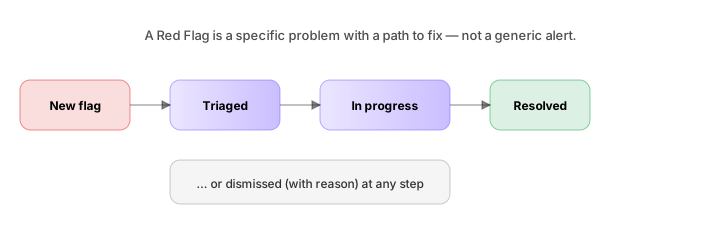
The Diagnostics agent is the only agent that runs whether you're in a chat or not. Every time a metric updates — a sales record imports, a payroll runs, an invoice goes overdue — the agent checks a battery of rules. If something crosses a threshold, a flag is created.
Anatomy of a flag
Every flag has, at minimum:
| Field | What it is |
|---|---|
| Title | One sentence. "Cash runway dropped below 3 months." |
| Severity | High / Medium / Low. See Severity levels. |
| Module | Which of the five it belongs to. |
| Detected at | When the engine first noticed. |
| Suggested fix | A concrete action (sometimes a Playbook). |
| Owner | Who should act. Defaults to the module owner. |
| Status | New / Triaged / In progress / Resolved / Dismissed |
A flag is not a chart. It is a specific, named problem with a path to fix it. We made this choice on purpose — generic "your sales are down" notifications get ignored.
Where flags appear
- Overall dashboard — top 3 active flags, ordered by severity then recency
- Risk Flags screen — the full list, with filters (module, severity, status, owner)
- Module dashboards — flags scoped to that module
- Morning Briefing — top 1–2 flags rolled into the daily message
- Chat — ask "what red flags do you see?" and you get the same list
How a flag is generated
Each flag comes from one of three sources:
1. Rule-based detection
Some flags are deterministic. "Cash runway < 3 months" is a fixed rule. "Invoice INV-104 overdue by > 30 days" is a fixed rule. These flags trigger the instant the condition becomes true.
The Diagnostics agent runs ~80 such rules across the five modules. You can see (but not edit) the active rules in Settings → Diagnostics → Rules. The Custom plan adds the ability to add your own rules.
2. Pattern detection
Some flags emerge from comparison — to your own history, or to your peer cohort. "Conversion rate dropped 12 points vs. trailing 90-day average." These flags require enough data history to be meaningful (typically 60+ days) and fire when the deviation crosses a calibrated threshold.
Pattern flags are the most valuable. They catch slow drift that a fixed threshold would miss.
3. Composite signals
The hardest flags. "Three independent signals suggest team burnout in Engineering." These blend several inputs and surface when no single input would have crossed alone.
Composite flags always carry their decomposition — clicking the flag shows you the three inputs and how each contributed. We do this to keep the agent's reasoning auditable.
What happens when a flag is created
The first action is deduplication. If you already have an active "Cash runway < 3 months" flag, a new one isn't created — the existing flag is updated with the new severity / metric value.
Then:
- It appears on the Overall dashboard.
- If it's High severity, it triggers a notification (in-app, plus email/WhatsApp if enabled).
- If it has a recommended Playbook, the Planner offers to run you through it.
- If it matches a workspace autopilot rule, an owner is auto-assigned and a task is opened (default off; see below).
Autopilot
By default, flags are suggestions — they sit in your queue until you triage them. You can switch on Autopilot for specific rules, which makes thola open a task automatically and assign an owner.
Autopilot rules per flag are set under Settings → Diagnostics → Autopilot. Common ones to turn on first:
- Auto-assign all Sales flags to the Sales lead
- Auto-open a stockout task when stock < 24h
- Auto-draft a payment reminder when invoice > 7 days overdue
Autopilot opens tasks but never sends external messages without your confirmation. The reminder is drafted; you click Send.
False positives
Flags are not infallible. When a flag is wrong:
- Dismiss it → the flag is hidden; if the underlying rule fires again it will be re-created
- Dismiss with reason → choose from a small set ("benchmark wrong for our stage", "intentional", "data is wrong") — the Diagnostics agent learns from these
- Suppress for 7 days → temporarily silence the rule for known short-term issues
Dismiss-with-reason is the better choice if you can. Five dismissals with the same reason will cause the Diagnostics agent to surface a Settings suggestion ("Want me to adjust the threshold to match your business?").
A simple example
Day 1, 9:00 AM — your CFO uploads March expenses. Total goes up by 18%.
Day 1, 9:00:03 AM — the Finance agent recalculates burn rate; the new burn rate, combined with current cash, puts runway at 2.8 months.
Day 1, 9:00:03 AM — the Diagnostics agent creates a flag:
🔴 High · Finance Cash runway dropped to 2.8 months from 3.4. Suggested fix: Review March's three largest expense increases. Most growth came from
MarketingandSoftware & tools. Owner: You (CFO not assigned).
Day 1, 9:00:05 AM — you get a WhatsApp ping if notifications are on.
Day 1, 9:02 AM — you open the flag, see the suggested fix, and choose Run Playbook → Cost diagnosis. The Planner walks you through six questions. The output is a list of three reversible cuts with savings.
You're back to 3.6 months runway by lunch.
→ Next: Severity levels