
What is thola?
thola is not a dashboard. It is a team of autonomous AI agents that work alongside you — managing sales, finance, team, and operations the same way a tiny, hyper-competent operations team would, if you could afford one.
You interact with thola the way you interact with a colleague: in plain language. The agents do the work. Where the work needs structured data, thola will show you a small form. Where the work takes time (onboarding, approvals, payroll runs), thola opens a task and tells you when it moves.
Every request reaches the Planner first. The Planner routes to the right specialist. You ask in plain language.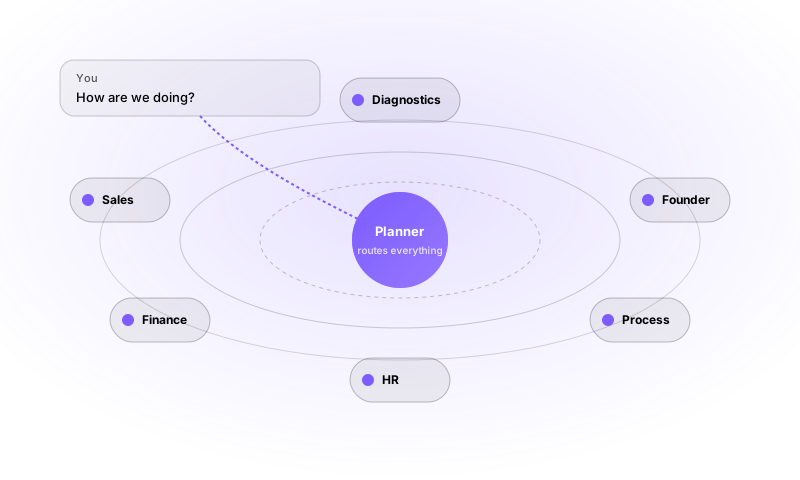
The mental model
There are three things to keep in your head as you use thola. After that, everything else is a detail.
1. The Planner is your point of contact
When you type into chat, you are talking to the Planner. The Planner is thola's "Chief of Staff." Its only job is to understand what you want and route it to the right specialist agent.
- You say: "Hire Alice for Sales."
- Planner thinks: "This is an HR request. I'll call the HR agent."
- Result: A draft job-requisition form, prefilled, ready for you to confirm.
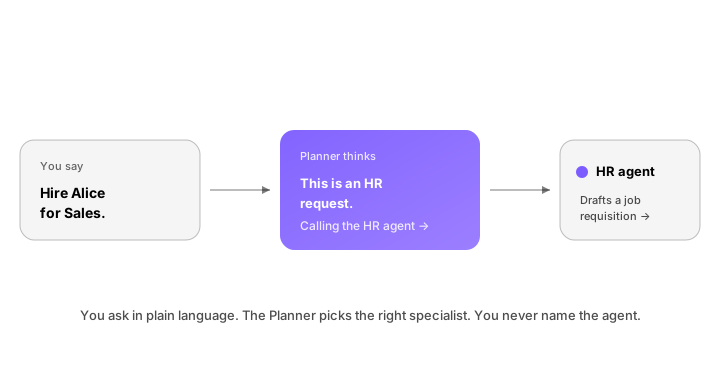
You will rarely think about who handled a request. You ask; the right agent answers.
2. The five-module health model
Every business that runs on thola is described by five health modules. They are visible on the Overall dashboard the moment you log in.
| Module | What it measures |
|---|---|
| Sales | Revenue, pipeline, conversion, CAC, retention, lead quality |
| Finance | Gross/net profit, expenses, cashflow, runway, debt, budget |
| Team | Headcount, revenue-per-employee, burnout signals, salary compliance |
| Process | Stock, defects, cycle time, purchase savings, capacity |
| Founder | Founder fit, co-founder fit, product–market fit, ICP/IDP scoring |
Each module produces a score. The five scores roll into one Business Health Score. When you ask thola "how are we doing?", that score is the answer — and the Planner will then tell you which module pulled it down (or up) the most.
3. Chat, Forms, Tasks, Tools
These are the four object types you'll meet:
- Chat — How you talk to thola. Everything starts here.
- Forms — Structured inputs the agents request when they need more than free text. Always small. Never make you re-enter data.
- Tasks — Long-running work. Onboarding, approvals, multi-step fixes. You get notified when status changes.
- Tools — The actions agents can take: send an invoice, draft an email, update a deal, run a payroll. You don't name tools; you describe the outcome you want.
That's the whole product surface.
What thola is good at
thola is built for the scaling startup or SME, especially in South Asia. The product is at its best when:
- you have some real data (sales sheets, ledgers, a small CRM) but it lives in too many places;
- you don't yet have a dedicated ops, finance, or analytics function;
- you want a single place that tells you the truth without you having to learn another dashboard.
Concretely, the use cases customers reach for most:
- "How are we really doing?" — a one-question health check across all five modules.
- "What's slowing us down this week?" — the Red Flags engine.
- "Update our numbers from last month." — drop in a sheet, let thola parse it.
- "Run a process for me." — onboarding, payroll, follow-up sequences via Playbook.
- "Bill the customer at the counter." — offline-first POS on thola mobile.
What thola is not
thola is opinionated. A few things it deliberately is not:
- It is not a generic chatbot. Every chat is grounded in your workspace data. The Planner won't write you a screenplay.
- It is not a reporting tool. thola is built to act, not just to show. You can read charts, but the product wants to move work forward.
- It is not "AI with a dashboard glued on." The agents are first-class. The dashboards exist to summarise what the agents already know.
Where to go next
If you haven't created a workspace yet:
→ Sign up and set up your workspace
If your workspace is ready and you want to feel out the product:
If you're a non-English speaker:
→ Language & locale — thola speaks English, Hindi, Tamil, Telugu, and Bengali natively.