
WhatsApp integration
WhatsApp is the most-used messaging app in our primary markets, so thola treats it as a first-class channel. This page is the complete list of what thola sends over WhatsApp and how to control it.
WhatsApp is one of four primary integrations. Each is independent and toggleable.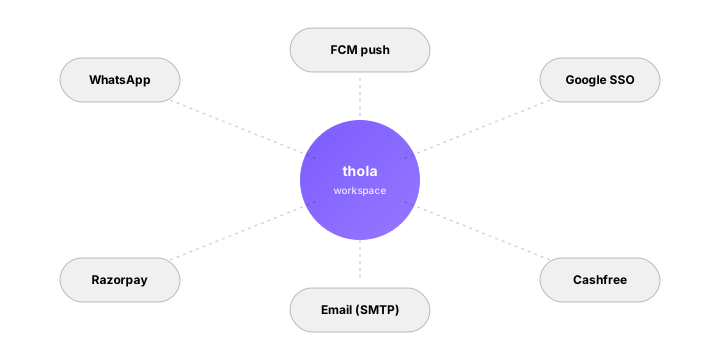
What thola sends over WhatsApp
| Message type | To | Default state |
|---|---|---|
| Sign-up OTP | New users | Always on |
| Workspace invite | Invitees | Always on |
| Red Flag (High severity) | Members | Opt-in |
| Morning Briefing | Members | Opt-in |
| Payment receipt | Owner | Opt-in |
| Payment reminder (to customers) | Your customers | Opt-in per customer |
| Worker-task link | Workers | Opt-in per project |
Notice: nothing customer-facing is on by default. We don't auto-message your customers. You decide channel per customer.
OTPs
WhatsApp OTPs are the default channel for:
- Sign-up — verify phone number at registration
- Password reset — verify identity before reset
- Sensitive action — some Settings changes (changing default payment method, transferring workspace ownership)
OTPs are 6 digits, valid for 5 minutes. We use the WhatsApp Business API under a registered business number.
If you can't receive WhatsApp (out of region, signal issue), every OTP flow has a "Send by SMS instead" fallback.
Workspace invites
When you invite a teammate by phone, thola sends them a WhatsApp message with:
- Inviter's name
- Workspace name
- A one-tap link to accept
The link is a deep-link: tapping opens the thola app (if installed) or the accept-invite web page (if not). The token in the link is single-use and expires in 14 days.
Customer-facing messages
For messages to your customers — payment reminders, invoice send, follow-up — WhatsApp delivery is opt-in per customer.
When you record a customer:
- You can tag their preferred channel (WhatsApp, SMS, email)
- The preferred channel is what thola uses for all outbound to them
- You can override per-message
When the agent drafts a customer message, the preview shows which channel and gives you a chance to switch.
The send confirmation
We never send a customer-facing WhatsApp message without showing you a preview first. Even on workspaces with agent-first posture, customer outbound is confirmation-required by design.
The preview shows:
- Recipient name + number
- Channel (WhatsApp, SMS, email)
- Message body, in the recipient's language
- "Send now", "Schedule", "Edit", "Cancel"
For bulk outbound (e.g. payment reminders to 30 customers), the preview lists all of them; you select-all or pick subset.
Turning WhatsApp off
You can disable WhatsApp in three scopes:
| Scope | Where | Effect |
|---|---|---|
| Just me | Profile → Notifications → WhatsApp | I personally don't get WhatsApp messages from thola |
| A specific customer | Customer record → Preferred channel | thola uses email/SMS for this customer |
| Entire workspace | Settings → Workspace → Channels → WhatsApp | No outbound WhatsApp from this workspace, ever |
The workspace-wide toggle is useful for businesses operating in regions where WhatsApp Business API has restrictions, or where customers have explicitly opted out.
Templates & approval
WhatsApp Business has rules about template messages — pre-approved formats for non-conversational outbound. thola uses approved templates for:
- OTPs
- Payment reminders
- Workspace invites
- Bill receipts
These templates are submitted to Meta for approval. Once approved, you can use them within thola without further configuration.
For custom outbound (an agent-drafted message to a specific customer about a specific deal), thola uses the "session" window — the 24 hours after the customer last messaged you. Outside that window, custom messages fall back to email.
Rate limits
Meta caps how many fresh-conversation messages you can send per day, based on your workspace's quality rating. thola respects this automatically:
- If you're approaching the cap, the agent warns you
- Bulk sends queue up and spread across the day
- Quality-rating drops are surfaced as a Medium Red Flag so you can investigate (usually: stop sending to customers who marked you spam)
Privacy
We log delivery state (sent, delivered, read) but not message content beyond the time the message is in the worker queue. The message body is encrypted at rest in our outbox; it expires from the outbox after 30 days.
Customer messages and your agent chats use the same agentic-messaging substrate but live in different scopes — customer-facing is workspace-isolated, never aggregated.
→ Next: Google SSO