
Overall dashboard
The Overall dashboard is the first screen you see after logging in. It exists to answer one question, instantly:
How are we really doing?
The answer is a single number — the Business Health Score, between 0 and 100. Underneath that number is a panel showing each of the five module scores and the trend on each.
One headline number, five module scores beneath, with deltas.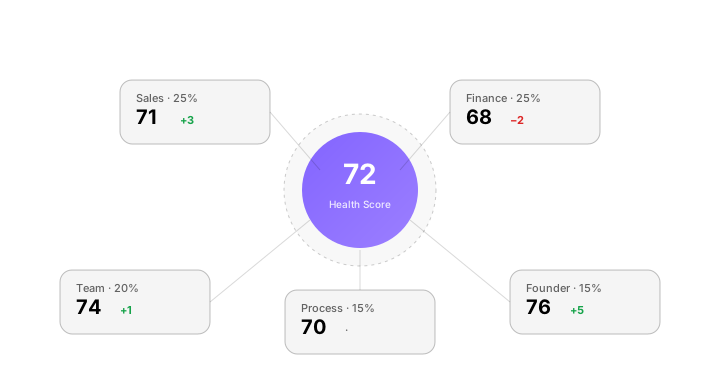
How the score is built
The Business Health Score is a weighted blend of the five module scores:
| Module | Default weight |
|---|---|
| Sales | 25% |
| Finance | 25% |
| Team | 20% |
| Process | 15% |
| Founder | 15% |
The weights are not industry-uniform. thola adjusts them based on your industry and stage (set during company setup):
- A pre-revenue startup will see Founder weighted higher and Sales lower.
- A retail business will see Process weighted higher (stock matters more).
- A services business will see Team weighted higher (people are the product).
You can see the live weights for your workspace under Settings → Scoring → Weights.
What the bands mean
| Score | Band | What it means |
|---|---|---|
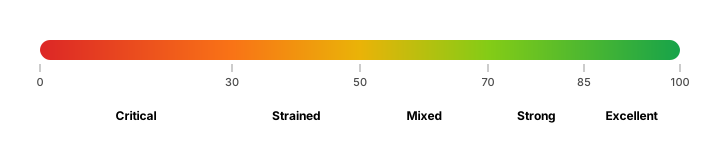
| 85–100 | Excellent | Healthy across all five modules. Look for growth levers. |
| 70–84 | Strong | Most modules green; one or two need attention. |
| 50–69 | Mixed | At least one module is dragging. Look at the lowest score first. |
| 30–49 | Strained | Multiple modules below threshold. Time to pause and fix. |
| 0–29 | Critical | Cashflow, retention, or runway in active danger. Read the Red Flags. |
The bands are colour-coded across the app: green / lime / amber / orange / red. The same colour scheme is used on Red Flags.
What makes the score move
The score updates the moment data updates. There is no nightly batch. The triggers:
- A new sales record imported → Sales score recalculates → Overall blends → ~1 second
- A payroll run completes → Team score adjusts → Overall reflects
- A Red Flag is fixed and closed → the relevant module score lifts
- You override a metric manually → the score recalculates and is flagged as manually edited
A score that doesn't move is also a signal. If you've imported a month of sales data and Sales doesn't budge, it means you're inside the expected band for your peer cohort. Sometimes the right answer is "everything's fine."
Reading the Overall page
The page is organised top-to-bottom:
- The number — Business Health Score, with delta vs. last month.
- The five rings — one ring per module, with score and trend arrow.
- The summary card — a one-paragraph narrative the Planner writes. "Sales held flat, Finance improved on lower spend, Team is the drag this month."
- Red Flags preview — the top 3 flags. Click for the full list.
- Recent actions — what you and the agents have actually done this week. Closed deals, sent invoices, finished tasks.
Every element on this page is a doorway. Click a ring → that module's dashboard. Click a flag → the diagnosis page. Click an action → the chat that created it.
The morning briefing
If you have notifications enabled, thola will send you a daily Morning Briefing with the score, the deltas, and one specific recommendation. The text reads like a Slack message from a competent colleague:
Morning. Health Score is 72 (+2 from yesterday). Sales is the only module that moved — three new deals closed. Cash runway holds at 4.1 months. One Red Flag came in overnight: Counter ops missed shift-end reconciliation in Branch 2. Want me to draft a fix?
To enable: Profile → Notifications → Morning Briefing. Available in all 5 languages.
Common questions
Why is my score so low when I'm doing fine? Almost always because thola only has partial data. The Founder module needs three data points to register a score; Process needs at least a week of stock movements. Run "What data is missing?" in chat — the Planner will tell you exactly which inputs would lift the score.
Can I hide a module I don't use? Yes — Settings → Scoring → Active modules. If you don't have inventory, turn off Process; the weights redistribute automatically. The hidden module no longer drags the score.
Why does the score recalc when I edit a number from last month? Because the score is current state, not a historical snapshot. To see the score at any past point, use History → Score timeline.
→ Next: Sales dashboard