
Severity levels
There are exactly three severity levels. Three is enough. We are very strict about not adding a fourth.
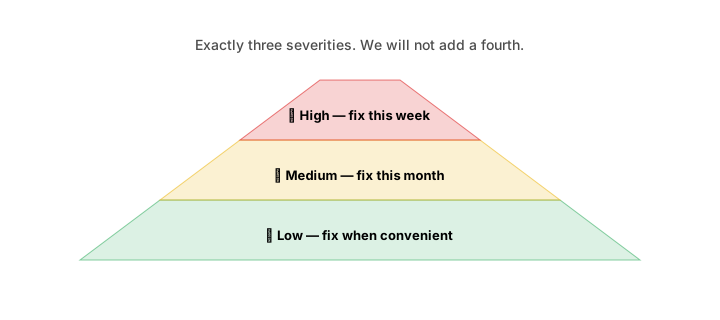
| Level | Colour | Meaning |
|---|---|---|
| 🔴 High | Red | Blocking growth, revenue, or operations — fix this week. |
| 🟡 Medium | Amber | Degrading performance — fix this month. |
| 🟢 Low | Green | Worth knowing — fix when convenient. |
What triggers what
The thresholds are calibrated per module and per industry. Some examples:
Finance
| Trigger | Severity |
|---|---|
| Runway < 1.5 months | 🔴 High |
| Runway 1.5–3 months | 🔴 High |
| Runway 3–6 months | 🟡 Medium |
| Budget overrun > 20% for 2 consecutive months | 🟡 Medium |
| AR aging — invoice > 60 days overdue, value > 5% of monthly revenue | 🟡 Medium |
| Gross margin drop > 5 percentage points MoM | 🟡 Medium |
| Single uncategorised transaction > 2% of monthly revenue | 🟢 Low |
Sales
| Trigger | Severity |
|---|---|
| Pipeline shrinks below 2× monthly target | 🔴 High |
| Conversion rate drops > 10 points vs. trailing 90-day average | 🔴 High |
| Conversion rate drops > 5 points | 🟡 Medium |
| Deals stuck in Negotiation > 14 days, > 3 deals | 🟡 Medium |
| Lead source converting at < 20% of cohort average | 🟢 Low |
Team
| Trigger | Severity |
|---|---|
| Payroll past due date | 🔴 High |
| Burnout signal > 70 for any employee | 🟡 Medium |
| Attrition rate > 1.5× peer cohort | 🟡 Medium |
| Single department salary compliance < 90% | 🟢 Low |
Process
| Trigger | Severity |
|---|---|
| Stockout predicted in < 24 hours | 🔴 High |
| Stockout predicted in < 72 hours | 🟡 Medium |
| Defect rate > 1.5× peer cohort | 🟡 Medium |
| Cycle time 90th percentile > 3× median | 🟢 Low |
Founder
| Trigger | Severity |
|---|---|
| Goal probability < 25% with > 60 days to deadline | 🟡 Medium |
| Goal probability < 15% | 🔴 High |
| Founder hours allocation drift > 30% from recommended | 🟢 Low |
| PMF band drops (Strong → Early, Early → Pre-PMF) | 🟡 Medium |
How thola notifies you
Notification policy is per-severity. The defaults:
| Severity | In-app | Push (mobile) | ||
|---|---|---|---|---|
| 🔴 High | ✅ | ✅ | ✅ | ✅ |
| 🟡 Medium | ✅ | rolled into daily | — | rolled into daily |
| 🟢 Low | ✅ | rolled into weekly | — | — |
You can override per channel under Profile → Notifications. Common adjustments:
- Turn off WhatsApp for High flags if you find it intrusive
- Turn on WhatsApp for Medium flags if you have an ops lead who lives in WhatsApp
- Roll High into a 30-minute digest if you're getting too many in a busy week
The default is deliberately quiet on Medium and Low. We do not want to be the app that pings you every five minutes.
Quiet hours
Set your quiet hours under Profile → Notifications. During quiet hours:
- 🔴 High flags still notify (we don't sit on critical issues)
- 🟡 Medium and 🟢 Low queue up and arrive after quiet hours end
This is independent of weekends — you can set "weekends are quiet" as a separate rule.
Tuning thresholds
For peer-cohort-based flags, the thresholds are set per industry and per stage. You can't change those (we calibrate them across the whole peer pool).
For rule-based flags, you can override:
- Settings → Diagnostics → Thresholds — adjust the numeric thresholds (e.g. "runway < 4 months" instead of 3)
- Settings → Diagnostics → Rules — disable a rule entirely
- Settings → Diagnostics → Custom rules (Growth and above) — add your own
A common one for early-stage companies: bump the High runway threshold to 2 months (because you operate at a leaner cash position) so it stops shouting at you.
Why we don't have a "Critical" tier
We considered it. Then we observed: in practice, "critical" becomes "the only thing anyone looks at," and "high" becomes background noise. Three severities, all of which the team actually triages, beats four severities where the bottom two get ignored.
If you genuinely need to escalate above High — for an active fire, like a production outage — open a task with priority urgent. Tasks have their own escalation system (paging, on-call rotation) that's better suited to the moment.
→ Next: The fix queue