
Check your runway honestly
You probably already know what your runway is. Or you think you do. This recipe is the five-minute habit that turns "I think" into "I know" — and catches the cheap-month illusion that flatters most founders' answers.
The scene
It's Sunday night. You're updating the runway sheet for the eighth Sunday in a row. The number says 8 months. You're nervous it's actually 5. You're not sure.
thola gives you a runway number that updates the instant your data does. No sheet. No Sunday. Just a number you can trust because you can see how it's calculated.
The steps
1. Make sure thola has the right inputs
Three numbers feed runway:
| Input | Where it lives |
|---|---|
| Current cash | A single number — your bank balance today |
| Burn rate | Calculated from your expense data |
| Revenue | From your sales data |
If you've already uploaded sales + expense data during Quickstart, this is already in place. The only thing you need to keep fresh is current cash — your bank balance.
Update it under Settings → Finance → Current cash position. Once a week is fine. Once a day is overkill.
2. Look at the runway card on Home
It's the second card on Home, right under the Health Score. It shows:
- A single number ("4.1 months runway")
- A trend arrow (up / down / flat vs last week)
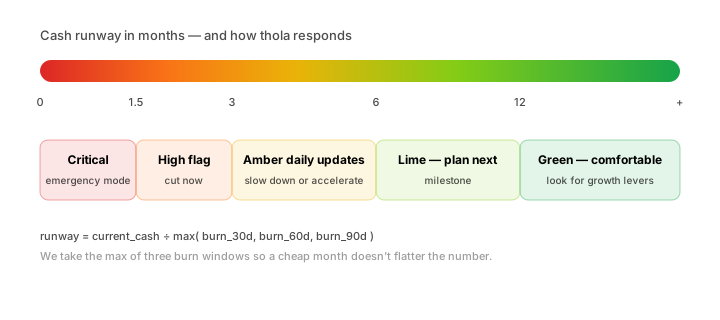
- A band colour (green / lime / amber / orange / red)
3. Tap the card for the math
The detail screen shows you, in plain terms: we take the most cautious of your recent monthly burn rates and divide your cash by that.
Specifically, thola looks at your spend across three windows — the last 30 days, last 60 days, and last 90 days — and uses the highest of the three as the anchor. Why the highest? Because if one of those months was unusually cheap, ignoring it keeps the runway number honest. We never let an irregularly quiet month flatter you.
| Window | Monthly burn | What it tells you |
|---|---|---|
| 30-day | ₹3.4L | Most current, most volatile |
| 60-day | ₹3.1L | Smoother |
| 90-day | ₹3.6L | Anchored against a quarter's worth of spend |
The cautious anchor here is ₹3.6L. With ₹15L cash on hand, your runway is 4.1 months.
4. Ask the agent if anything's off
Try:
Why did burn jump in April?
The Finance agent compares April to previous months and surfaces the top contributing categories. Maybe Marketing doubled. Maybe a one-time professional fee. Maybe a salary hike. You'll see the line items, not just the total.
If it was a one-off (one-time legal fee, one-time hardware purchase), tell the agent:
Treat the ₹2L April legal fee as non-recurring.
The runway recalculates without it. The recalculation is shown clearly — you're not gaming the number, you're getting an honest answer that separates one-off from baseline.
The gotchas
Don't fix runway by changing the math
When the runway number drops, the temptation is to recategorise a line, find a one-off to exclude, anything to make the number bigger. Don't. Either it's actually non-recurring (it is — flag it) or it isn't (don't flag it).
The agent will push back if you exclude too much. "Marking another ₹1.5L as non-recurring — that's 6 months in a row you've flagged something. Is this a pattern, not an exception?"
Conservative mode caps long-range forecasts
If your workspace is set to the cautious side (under Settings → Workspace → How the agents respond), the Finance agent refuses to project runway beyond 60 days. Forecasts past that need the more proactive setting.
For most founders, the proactive setting is right. Cautious is for risk-averse environments — audited, regulated, or family money.
Subscription revenue + one-time revenue need separate treatment
If your revenue mix has a one-time deal that just closed (a ₹40L project payment, all up front), the burn-rate math wouldn't reflect it correctly — that's a cash injection, not "monthly revenue". Tell the agent:
Treat the ₹40L Globex payment as one-time cash, not monthly revenue.
The agent moves it to a separate ledger. Cash position rises. Burn calculation is unaffected. Runway becomes correct.
What you'll feel after a month
Three things settle:
- The Sunday-night spreadsheet stops. You stop maintaining the sheet because the number on Home is the same one you'd have arrived at. Save 30 min/week.
- The 3-month-out conversation gets concrete. Instead of "I think we'll be OK", you can say "we're at 4.1 months, here are the two things that would extend it." Investors and co-founders appreciate the difference.
- You catch the drift. The number doesn't usually crash — it slides slowly. Without thola, you notice in month 9. With thola, you notice in month 6, when you have time to act.
What's next
- Categorise your expenses — keeps the burn-rate math clean
- Chase overdue invoices — collections directly extends runway
- Reference → Finance scoring — full methodology
If runway is your biggest worry right now, the Cost Diagnosis Playbook walks you through cuts in a structured way. Worth a look.