
Roles & permissions
Every member of a workspace has exactly one role. That role determines:
- Which modules they can see
- Which data within each module they can read
- Which actions they can take
- Whether they can manage other members
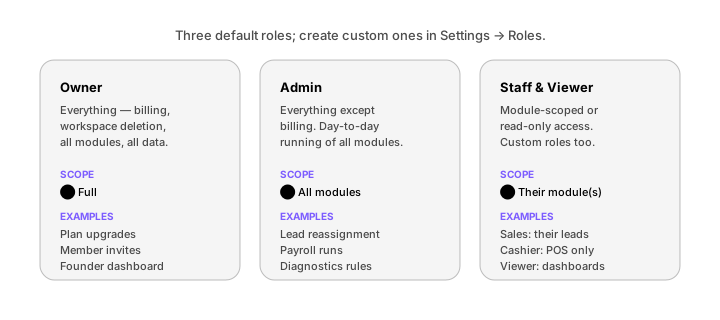
The default roles
The five roles that ship with every workspace:
| Role | Module access | Data scope | Special powers |
|---|---|---|---|
| Owner | All | All | Billing, workspace deletion |
| Admin | All | All | Settings, member management |
| Co-founder | All read; write on Founder + chosen | All | Founder dashboard write |
| Staff | Their assigned modules | Their assigned records | — |
| Viewer | All read | All | — |
You'll notice:
- Owner vs Admin — same as Admin, plus billing. There is always exactly one Owner.
- Co-founder — like Admin in terms of read scope, but specifically gets write access to the Founder dashboard, which Admins do not.
- Staff vs Viewer — Viewer is read-only across modules; Staff is action-capable within their own scope.
The permission grid
Every action in thola maps to a permission like sales:write, finance:read, hr:approve_leave. The defaults:
| Permission | Owner | Admin | Co-founder | Staff (Sales) | Viewer |
|---|---|---|---|---|---|
sales:read | ✅ | ✅ | ✅ | ✅ | ✅ |
sales:write | ✅ | ✅ | ✅ | ✅ (own leads) | ❌ |
sales:bulk_import | ✅ | ✅ | ✅ | ❌ | ❌ |
finance:read | ✅ | ✅ | ✅ | ❌ | ✅ |
finance:write | ✅ | ✅ | ✅ | ❌ | ❌ |
finance:invoice_send | ✅ | ✅ | ❌ | ❌ | ❌ |
hr:read | ✅ | ✅ | ✅ | ❌ | ✅ |
hr:payroll_run | ✅ | ✅ | ❌ | ❌ | ❌ |
process:read | ✅ | ✅ | ✅ | ❌ | ✅ |
process:po_create | ✅ | ✅ | ❌ | ❌ | ❌ |
playbook:run | ✅ | ✅ | ✅ | ❌ | ❌ |
playbook:edit | ✅ | ✅ | ❌ | ❌ | ❌ |
members:invite | ✅ | ✅ | ❌ | ❌ | ❌ |
billing:manage | ✅ | ❌ | ❌ | ❌ | ❌ |
The full permission catalogue is in Settings → Roles → Permission catalogue. There are ~60 permissions.
Custom roles
For anyone who doesn't fit the five defaults, build a custom role:
- Settings → Roles → New role
- Name the role (e.g. "Branch Manager", "AP Clerk", "Sales Lead")
- Tick the permissions
- Save
The role is immediately assignable to any member.
A few examples we see often:
- Branch Manager —
sales:*,process:read,team:readfor their branch - AP Clerk —
finance:read,finance:invoice_send, no payroll - Field Worker —
process:writefor their assigned tasks only - External Auditor —
*:readworkspace-wide, plus audit-log export
Module-level vs record-level scope
A permission like sales:write says what you can do. A scope says which records. The default scopes:
- All records — see everything in the module (Admins, Co-founders)
- Own records — only records owned by or assigned to you (Staff)
- Branch records — only records tied to your branch (Branch Manager)
- None — module is invisible
Scope is set per-role under Settings → Roles → Scope.
The Founder dashboard, specifically
The Founder dashboard has its own access setting, separate from RBAC. By default:
- Owner — full access
- Co-founder — sees Co-Founder Fit panel only
- Admin, Staff, Viewer — no access
To grant an Admin access to the full Founder dashboard, go to Settings → Founder → Access and tick their name. This is one of the few cases where module access is per-person, not per-role.
Auditing
Every permission grant, role change, and member action is recorded in the audit log:
- Settings → Workspace → Audit log
- Filter by member, by action, by date
- Export as CSV
The audit log retains 12 months by default; longer on Pro and above.
Common questions
Can a member have two roles at once? No — one role per workspace. Use a custom role to compose.
Can I temporarily elevate someone? Yes — Settings → Members → [member] → Temporary elevation. Pick a role and a duration (max 7 days). Reverts automatically.
Can the Sales agent see what the Sales rep sees, or what I see? Whatever the caller of the chat sees. Agents always operate in the scope of the user who asked. So when a Staff (Sales) member asks "show me all deals," they see only their own deals; when an Admin asks the same, they see all.
→ Next: Co-founder setup