
Sales dashboard
The Sales dashboard is owned by the Sales agent. Its job is simple: track revenue, pipeline, and the efficiency with which the first becomes the second.
This page covers what each metric on the dashboard means, what it takes to move it, and the small set of questions you can ask the Sales agent that will make the rest of the module make sense.
What it tracks
There are seven headline metrics, in this order:
| Metric | What it is |
|---|---|
| Revenue | Closed-won revenue in the current period. Compared to the previous period. |
| Pipeline value | Total value of open deals, weighted by stage probability. |
| Conversion rate | % of leads that become customers, end-to-end. |
| CAC | Customer Acquisition Cost — total sales+marketing spend divided by new customers. |
| LTV | Average lifetime value per customer (revenue × retention months). |
| Retention | % of customers from N months ago still active today. |
| Lead quality score | A 0–100 indicator of how well your incoming leads match your ICP. |
Each metric has a sparkline showing the last 12 weeks (or months, depending on your business cadence). Click any metric for a deep-dive.
What data the Sales agent needs
To get a full Sales score, thola needs three things:
- Lead data — names, sources, owners, status, value. Imported via CSV or kept in thola's CRM.
- Closed deals — when, value, customer, owner, lead source.
- Spend — sales + marketing cost per period.
The first two come from your CRM or sales spreadsheet. The third comes from your accounting tool or a monthly upload.
If you only have closed deals (no leads), thola will compute revenue but mark conversion, CAC, and lead quality as N/A — needs lead data. The score will be calculated on what's available, and the dashboard tells you what's missing.
How the Sales score is calculated
The score is a weighted blend of:
- Growth (40%) — current revenue vs. previous period
- Pipeline health (25%) — stage distribution and aging
- Efficiency (20%) — LTV/CAC ratio
- Quality (15%) — lead score average
It is benchmarked against your peer cohort (industry × stage × geography). A 30% MoM growth scores higher for a 2-year-old SaaS than for a 10-year-old retail chain. We will not flatter you.
Talking to the Sales agent
The Sales agent answers questions like a sales ops analyst would. A few prompts to try:
| You say | What happens |
|---|---|
| "Show me deals closing this month." | Returns a table of Negotiation and Verbal Yes deals with target close dates. |
| "Which lead source converts best?" | Cohort analysis grouped by source, ordered by conversion rate. |
| "Why is conversion down?" | A 3–4 sentence diagnosis with the top contributing factors. |
| "Draft a cold email for this lead." | Uses the lead's industry + size to write a first-touch email. |
| "Move the Acme deal to Negotiation." | Updates the deal status and recalculates pipeline. |
| "Forecast revenue for next quarter." | Pipeline × stage probability + seasonality. Tells you the confidence interval. |
The Sales agent will not make up numbers. If it doesn't have data, it tells you. Don't be surprised when it pushes back.
Lead lifecycle, in thola
The default stages. Add or rename them in Settings → Sales → Pipeline stages.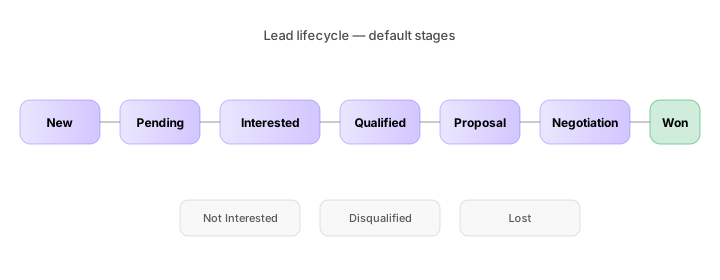
Every lead moves through this lifecycle. The stages are configurable, but these are the defaults:
New → Pending → Interested → Qualified → Proposal → Negotiation → Closed Won
                            ↘ Not Interested · Disqualified · Lost
You can rename stages or add new ones in Settings → Sales → Pipeline stages. Don't add more than 7 — the funnel math gets unstable.
Bulk lead import
The fastest way to populate the dashboard from a sales spreadsheet is the bulk import flow. The pattern is upload → preview → resolve → confirm:
- Upload a CSV or XLSX (up to 10 MB).
- Preview — thola shows you what it parsed and which leads are duplicates.
- Resolve — for each duplicate, choose skip, replace, or merge.
- Confirm — the leads are written and the score updates.
You can review every past import in Sales → Import history. Every imported file is kept downloadable for 90 days for audit.
Lead distribution
If you have a sales team, you'll want to assign leads to people. thola supports three modes:
- Manual — pick the owner per lead.
- Round-robin — evenly distribute across selected employees.
- Agent-routed — the Sales agent ranks leads as simple / mid / complex and routes complex leads to your most experienced reps.
Agent-routed assignment is always a two-step flow: thola previews the assignments, you confirm before they're committed. Nothing is auto-routed without your sign-off.
→ Deeper detail in Talking to thola → Memory & history and Playbook → Workflows.
Common questions
Why is my Sales score lower than my growth would suggest? Almost always LTV/CAC. A high-growth business with terrible unit economics gets a mediocre score, by design.
Can I track deals in a currency other than my workspace currency? Yes — set a deal's currency on creation. thola converts using the daily exchange rate snapshot from the day the deal closed.
My CRM is elsewhere. Do I have to migrate? No. You can keep your CRM and just upload a weekly CSV. Or use the API (coming soon). Or use thola's CRM as a thin overlay.
→ Next: Finance dashboard