
thola mobile
thola mobile is the Flutter app that runs on Android, iOS, Windows, and Linux. It is not a stripped-down version of the web app. It is purpose-built for a different user:
- The web app is for founders and managers who think on a desktop
- thola mobile is for operators who run the business at the counter, on the road, on the shop floor
The two share a backend, a workspace, and a data model. They show very different surfaces.
What thola mobile is for
The mobile app is built around four core jobs:
- POS at the counter — bill customers, take payments, update stock — even with no network
- Projects on the road — track tasks, approve work, capture site notes, sign off
- Attendance & fieldwork — check in with geo-tagging, log location-bound work
- Quick chat with thola — voice prompts, fast answers, push-driven Red Flag pings
Cross-platform reach
| Platform | Status |
|---|---|
| Android | ✅ Production. Google Play live. |
| iOS | ✅ Production. App Store live. |
| Windows | ✅ Production. Windows Store + direct installer. |
| Linux | ✅ Production. Flatpak. |
| macOS | Beta (sign up via support) |
The Windows and Linux builds are real — not just "the web app running in Electron." They use the same offline-first SQLite layer as mobile, which means an in-store till PC can run thola POS offline as comfortably as a phone.
How it talks to the backend
Every action is written locally first, queued in an op-log, and reconciled by the sync-v2 microservice when the network returns.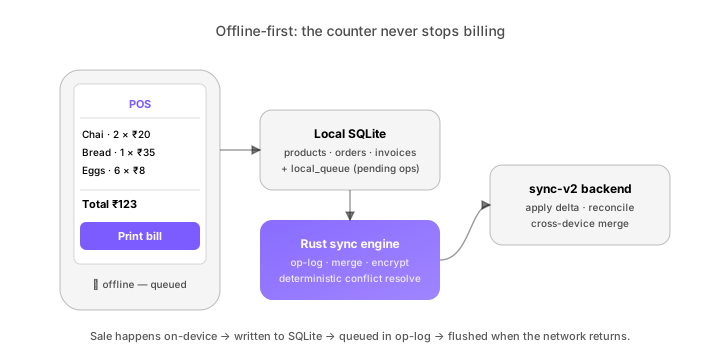
The flow is always local-first:
- Action happens on the device — written to local SQLite
- The op is added to the local queue
- When online, the Rust sync engine flushes the queue to the sync-v2 backend
- sync-v2 reconciles against other devices and the central store
The whole thing is designed so that the counter never blocks on the network.
What's mobile-only vs. web-only
Mobile-only:
- Voice quick-order (the on-counter "chai, two please")
- Barcode scanner (camera-based, mobile + Windows + Linux)
- Geo-tagged attendance
- Camera-based receipt OCR
- Push notifications with deep links
- In-app subscription via Play / App Store
Web-only:
- Admin console for member / role management
- Custom Diagnostics rule editor
- Custom Playbook editor
- Bulk lead distribution UI
- Full audit-log export
- Pricing / payment management
There is a deliberate asymmetry. Admin and configuration live on the web. Operating and selling live on mobile.
How to install
| Platform | How |
|---|---|
| Android | Play Store (opens in a new tab) |
| iOS | App Store (opens in a new tab) |
| Windows | Microsoft Store (opens in a new tab) or direct .msi from downloads.thola.ai (opens in a new tab) |
| Linux | Flathub (opens in a new tab) or direct .flatpak |
First launch asks you to sign in — same credentials as the web. The app fetches your workspace's local data and you're up.
Languages
thola mobile supports six languages — one more than the web app:
- English (
en) - Hindi (
hi) - Tamil (
ta) - Telugu (
te) - Kannada (
kn) - Malayalam (
ml) - Bengali (
bn)
The mobile-only locales (Kannada, Malayalam) are first-class — UI, help content, and agent replies all available. Bengali joined the mobile app slightly later than the web; both are now in lockstep.
Branches
If your business has multiple branches, the mobile app makes branch context explicit. The header always shows the current branch. To switch:
- Tap the branch name in the header
- Pick another branch from the list
- Data on every screen refreshes for that branch
Admins see all branches; branch managers see theirs; cashiers see only the one they're assigned to.
→ Next: Offline mode