
Finance dashboard
The Finance dashboard is the most boring screen in thola, and the most important one. It is owned by the Finance agent — the agent that will, more than any other, decide whether the business is alive in twelve months.
What it tracks
| Metric | What it is |
|---|---|
| Gross profit | Revenue minus cost of goods sold. |
| Net profit | Gross profit minus operating expenses, taxes, and one-time costs. |
| Cashflow | Inflows minus outflows in the current month. |
| Runway | Months of cash left at the current burn rate. |
| Burn rate | Average net cash spent per month over the last 90 days. |
| Expenses by category | Salaries, rent, COGS, marketing, ops, other. |
| AP/AR aging | Unpaid invoices in / unpaid invoices out, bucketed by age. |
| Budget vs. actual | Current period budget compared to actual spend. |
Each metric has a 12-period sparkline. Cashflow and runway are the two with the most aggressive alerting — they trigger High-severity Red Flags as soon as they cross safety thresholds.
What data the Finance agent needs
Three buckets:
- Revenue — closed deals (from Sales) + any non-deal revenue you record manually.
- Expenses — your bank ledger, or a categorised expense CSV. Once a month is fine.
- Cash position — current bank balance. Refresh whenever you reconcile.
If you only give thola revenue + expenses, runway is computed by assuming a starting cash balance equal to last month's revenue. That's better than nothing, but plug in a real cash position when you can.
How the Finance score is calculated
The score weights:
- Margin (30%) — gross profit / revenue
- Cash health (30%) — runway, with a steeper drop below 3 months
- Discipline (20%) — variance of actual spend vs. budget
- Growth efficiency (20%) — revenue growth divided by spend growth
A startup with negative margin but 18 months runway will score middling. A profitable business with 1 month runway will score worse than its margin would suggest — because cash is what kills companies.
Runway: the only chart anyone looks at
The single most important chart in the whole product. Cash is what kills companies.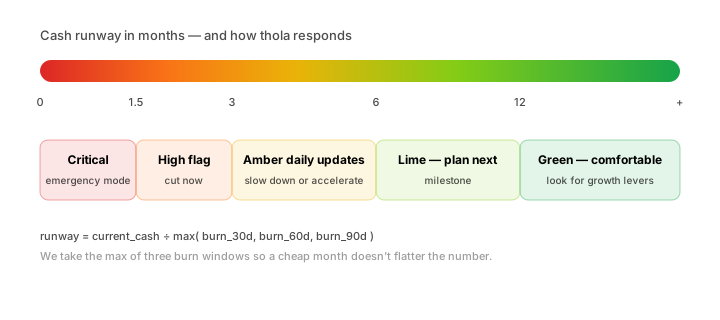
The runway chart is on the dashboard, and again on the Founder briefing, and again in the Morning Briefing. There's a reason.
Runway is computed as:
runway_months = current_cash / max(burn_rate_30d, burn_rate_60d, burn_rate_90d)We use the max of three burn windows so a particularly cheap month doesn't make runway look better than it is.
Bands:
- > 12 months — green. Comfortable.
- 6–12 months — lime. Plan the next milestone.
- 3–6 months — amber. Start reducing burn or accelerating revenue.
- 1.5–3 months — orange. High Red Flag. Cut now.
- < 1.5 months — red. Critical. Emergency mode.
When you cross into amber, thola sends a daily update. When you cross into orange, it triggers a Playbook with specific cost-reduction steps and asks you to walk through them.
Talking to the Finance agent
| You say | What happens |
|---|---|
| "What's our burn rate?" | Calculates last-30-day net cash and shows trend. |
| "How much runway do we have?" | Divides cash by burn, with the three-window check. |
| "Flag any expenses over ₹50,000 last month." | Scans the ledger and lists anomalies. |
| "Project revenue for Q3 from our pipeline." | Pulls from Sales and forecasts with stage-probability math. |
| "Show me budget variance." | Compares actuals to the budget set in Settings → Finance → Budget. |
| "Draft a payment reminder for overdue invoice INV-104." | Composes an email in the customer's language and tone. |
The Finance agent is the one most prone to conservative answers — if your conservative posture is on (Settings → Workspace → Agentic posture), it will refuse to forecast beyond 60 days. Switch to agent-first for longer horizons.
Invoices and AR
If you raise invoices through thola, the Finance dashboard tracks them automatically. The lifecycle:
Draft → Sent → Viewed → Partially Paid → Paid · Overdue · DisputedYou can ask the agent things like:
- "Which invoices are more than 30 days overdue?"
- "Send a reminder for all invoices in Overdue."
- "What's our average days-to-pay this quarter?"
Reminders are sent in the customer's language. We never auto-send anything thola hasn't shown you in preview first.
Expense categorisation
When you upload bank-statement CSVs, thola tags each row with a category. Categories are workspace-editable in Settings → Finance → Categories. The default set:
- Salaries & payroll
- Rent & utilities
- COGS
- Marketing & ads
- Software & tools
- Travel
- Professional fees
- Other
Uncategorised rows show in the Triage queue at the bottom of the dashboard. The Finance agent will guess a category for each; you click to confirm or change. Five minutes of triage a month keeps the data clean.
Budget vs. actual
Set a monthly budget per category under Settings → Finance → Budget. The dashboard shows green if you're under budget, amber if you're within 10%, red if you're over.
The Finance agent will surface a Medium Red Flag if any single category exceeds budget by more than 20% for two consecutive months — that's the threshold where a one-off becomes a pattern.
Tax & GST
If your workspace is in India, the Finance dashboard exposes:
- GST collected per period
- GST paid per period
- Net GST liability with the next due date
- TDS withheld on payments
These numbers flow into the invoice rendering and the AP/AR aging automatically. We do not file returns for you, but every number you'd put on a GSTR-1 or GSTR-3B is available as an export.
Common questions
Can I have multiple bank accounts? Yes. Add them under Settings → Finance → Accounts. Each transaction is tagged with its source account.
Can I lock historical periods? Yes — Settings → Finance → Period locks. Past months can be marked read-only so no accidental import overwrites closed-book numbers.
Why do my numbers differ slightly from my accounting tool? thola uses cash basis by default. Your accounting tool might be accrual. Toggle under Settings → Finance → Accounting basis.
→ Next: Team dashboard