
Talking to thola
The chat is where everything starts. This page is the operating manual for the chat itself — the patterns, the small habits, and the pitfalls.
The basics
You start a conversation from New chat in the sidebar. A conversation has:
- A title (auto-generated from the first message, editable)
- A language (defaults to your reply-language preference)
- A scope (defaults to your whole workspace; can be narrowed to a single module)
- A history that persists forever — searchable, exportable
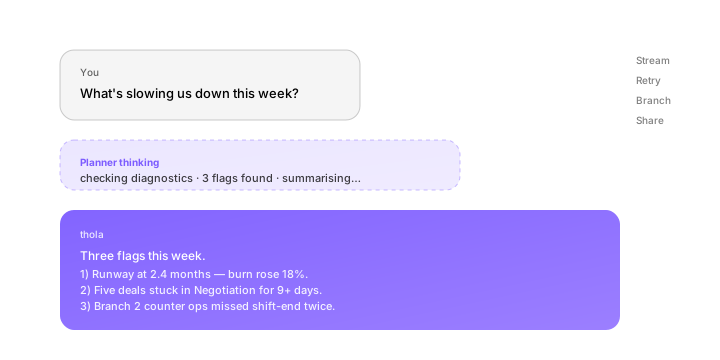
Each message you send goes to the Planner. The Planner classifies the intent, fetches any data it needs, and routes to a specialist agent (or handles the request itself if it's a meta-request like "summarise this chat"). The reply streams back.
How to write a good prompt
Three patterns work better than the rest.
Pattern 1 — Ask, then narrow
The fastest way to find anything in thola is to ask broadly, then narrow.
You: "How's Sales doing?" thola: Sales is at 71/100. Pipeline value is up 12% MoM; conversion dropped 4 points. Three deals are stuck in Negotiation. You: "Show me the three stuck deals." thola: [Table of three deals with last activity date and assigned rep.] You: "What does the youngest one need to unblock?" thola: [Specific recommendation based on lead's history.]
The Planner remembers the context across turns — you don't need to re-name the deal.
Pattern 2 — State the outcome, not the steps
Don't tell thola how to do something. Tell it what you want done.
✅ "Send a payment reminder to all customers over 30 days overdue." ❌ "Open the Finance module, filter invoices by status overdue, sort by age, and send each one an email…"
The agents know how to use their tools. Free yourself from the click-paths.
Pattern 3 — Use names, not pronouns
When you're switching topics, name the thing.
✅ "What's the status of the Globex deal?" ❌ "What's the status of that one?"
Pronouns work inside a single thread of thought, but they drift across topic changes. Names always work.
Replies stream, and that's important
Reply text streams character by character. There's a reason: as the reply streams you can:
- Read the first paragraph and decide if you need to wait for the rest
- Cancel the reply if it's going the wrong way (the X next to the spinner)
- Stop and redirect — type a follow-up while the model is still finishing the first reply; thola will catch up
The streaming UI also shows a thinking trace for complex requests — a one-line "looking up sales data… checking peer cohort… composing…" so you can see what the agent is doing.
Confirmations
Some agent actions go straight through. Others ask for a confirmation. The rule is straightforward:
| Type of action | Confirmation? |
|---|---|
| Read-only (queries, summaries, analyses) | No |
| State changes you can easily undo | No |
| State changes that touch money | Yes |
| State changes that touch external systems (email, WhatsApp, payments) | Yes |
| Bulk actions (more than 5 records at once) | Yes |
When confirmation is needed, the agent shows a preview card with everything it's about to do. Click Confirm to execute, Edit to tweak, Cancel to abandon.
Forms vs. free text
For some inputs, free text isn't enough. When the agent needs structured input (a date, an amount, a category from a fixed list), it will display a small form inside the chat. Forms are always:
- Short — never more than 5 fields
- Pre-filled with thola's best guess
- Cancellable — closing the form just abandons the action
A form inside chat is not a context switch. You stay in the conversation, you fill the form, you continue.
Multi-turn memory inside one chat
Within a single conversation, the Planner remembers:
- Every entity you've mentioned (deals, customers, employees)
- Every constraint you've added (date ranges, currencies, filters)
- The "state" of the conversation (e.g. "we're discussing the Globex deal")
Memory inside a chat lasts as long as the chat. Memory across chats works differently — see Memory & history.
Stop / retry
Below every reply you get:
- Retry — same prompt, fresh reply (uses tokens, so use sparingly)
- Like / dislike — feedback signal; helps us tune the Planner
- Copy — copy reply text
- Branch — start a new conversation forked from this point. Useful for "what if I asked the same thing differently."
Voice (mobile)
On thola mobile, the chat input has a microphone. Tap it, speak, tap to stop. Transcription happens on-device where possible (no audio leaves the phone unless thola needs to fall back to cloud STT for a hard accent). The text becomes the prompt.
This is especially useful at the counter, in the car, or for any language where typing is slow.
Common questions
Can I /command the chat? Not today. We use plain language deliberately — slash commands grow without bound and never feel as natural. The Planner handles every intent.
Can the chat have multiple users? Each chat is per-user. To collaborate on a finding, share the chat (button in the top-right) — the recipient sees a read-only thread and can fork a follow-up chat of their own.
How long is a chat history kept? Forever, unless you delete it. Free-tier accounts have a 90-day cap; paid accounts are unlimited.
→ Next: Uploading data